HR and payroll
HR & Payroll keeps your people and their pay in one place: an employee register, a profile per person with job, compensation, leave and expenses, and a monthly payroll run prepared for the UAE Wage Protection System. This page covers each screen and explains what WPS and the SIF file are.
Employees, salary slips and timesheets read the ERPNext engine when it is connected and fall back to demo data when it is not. The demo payroll is September 2026 for four employees totalling AED 45,500 net.
Employees
Open HR & Payroll or go to /hr. The page is titled HR & Payroll with the subtitle "Employees, salary slips and WPS payroll (SIF export)". Three header buttons: Export WPS SIF and Run payroll both open the payroll run page, and Export downloads the table as payroll with the columns ID, Employee, Department, Basic, Allowances and Net (AED). An Add employee button sits above the table; Quick Create then Staff member opens the same modal.
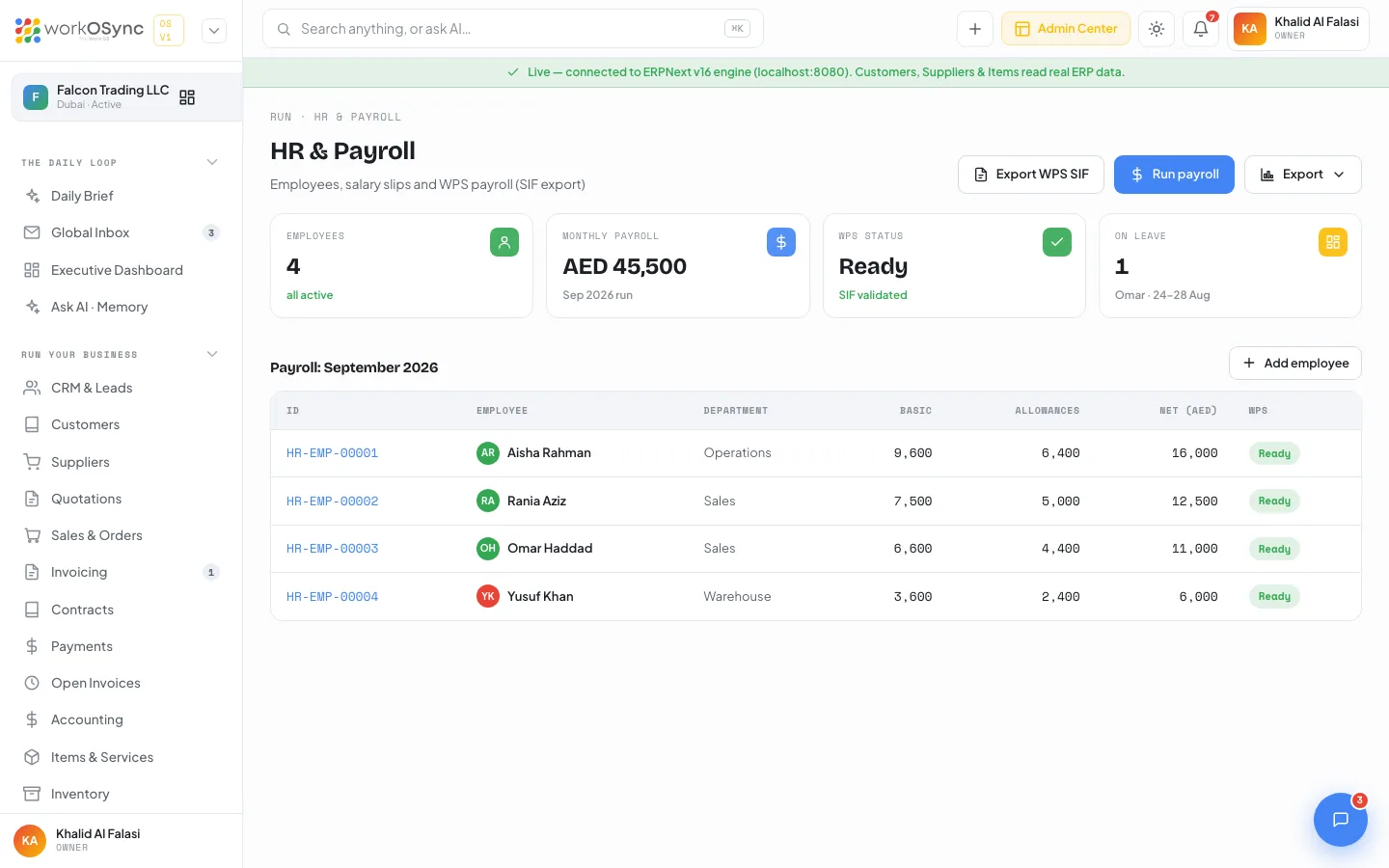
| Tile | What it shows |
|---|---|
| Employees | Headcount, all active. |
| Monthly payroll | Total net pay for the current run (Sep 2026). |
| WPS status | Ready, with "SIF validated". A fixed label in this build. |
| On leave | Who is away and when. A fixed label in this build. |
The Payroll - September 2026 table has ID (linked to the profile), Employee, Department, Basic, Allowances, Net (AED) and WPS (Ready). With the live engine, net pay is the annual cost to company divided by twelve, basic is 60% of that and allowances are the remainder. Demo rows include HR-0001 Aisha Rahman (Operations, 12,000 basic, 4,000 allowances, 16,000 net), HR-0002 Rania Aziz (Sales), HR-0003 Omar Haddad (Sales) and HR-0004 Yusuf Khan (Warehouse).
Adding an employee
| Field | Default | Notes |
|---|---|---|
| Full name | Empty | Required ("Employee name is required."). |
| Department | Operations | Operations, Sales, Finance, Warehouse, Admin, HR, IT. |
| Designation | Empty | For example Sales Executive. |
| Date of joining | Today | |
| Work email | Empty | |
| Basic salary (AED) | 8,000 | The fixed component paid through WPS. |
| Allowances (AED) | 2,000 | The variable component; net is basic plus allowances. |
Add to team creates the ERPNext Employee with the live engine and refreshes the table. In demo mode the person is kept in this workspace with an EMP- id and a New badge, and a Remove control replaces the WPS badge on that row.
Employee profile
Click an ID to open /hr/[name]. The banner shows the role derived from the department (Operations Lead, Sales Executive, Finance Manager, Warehouse Supervisor, Administrator, or the department name followed by Team), the name, email and phone, with buttons Send message (opens Chat), Reminders and Salary slip (opens the payroll run). Four stats follow: Open projects, Completed, Total hours and Leave days. Back to HR & team returns to the list.
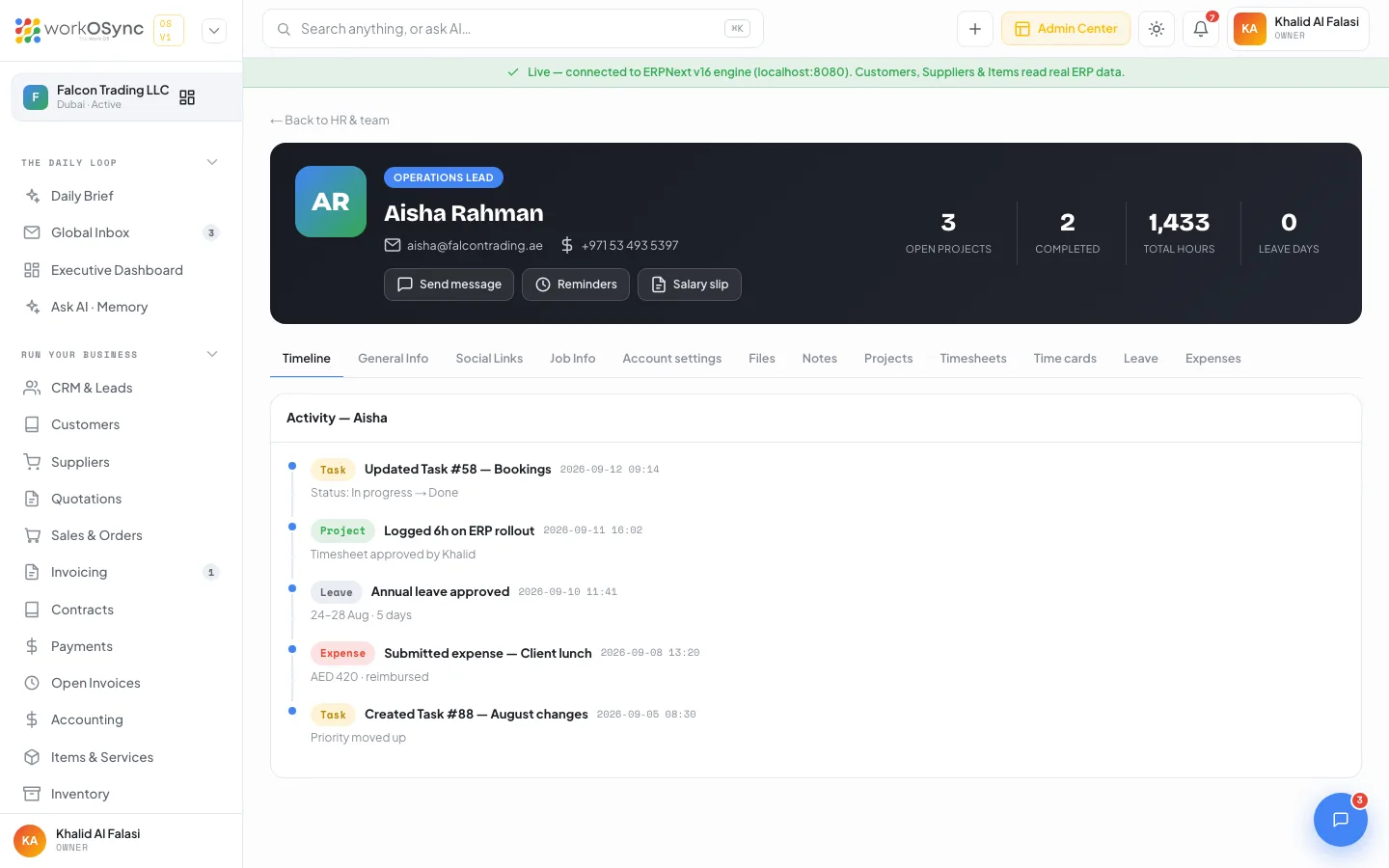
| Tab | Contents |
|---|---|
| Timeline | An activity feed for the person. |
| General Info | Full name, Employee ID, Email, Phone, Department, Nationality, Date of birth, Gender, Address, Emergency contact. |
| Social Links | LinkedIn, X / Twitter, Instagram, Website. |
| Job Info | Employment: Designation, Department, Full-time, Date of joining, Reporting to, Work location. Compensation (Sep 2026): Basic, Allowances, Gross pay, Deductions, Net pay (WPS), Salary bank. |
| Account settings | System role, Access level, Two-factor auth, Language, Timezone, Status, Last login. |
| Files | The person's documents (Emirates ID, passport copy, employment contract, visa page in the demo) with an Upload button that adds files from your computer; uploads are kept in this browser. |
| Notes | "Add a private note", saved in your browser. |
| Projects | Projects the person is on, with role, progress and status. |
| Timesheets | Hours by day for a month, with a Chart or Table view, previous and next month controls, and the month and lifetime totals. |
| Time cards | Recent attendance rows (clock in, clock out, hours) with their approval status. |
| Leave | Balance tiles (Annual left, Sick left, Annual total, Taken) and a requests table with a Request button. |
| Expenses | Expense claims with amount, date and Reimbursed or Pending status. |
Requesting leave
Request on the Leave tab opens the Request leave modal: Leave type (Annual leave, Sick leave, Unpaid leave, Compassionate leave), From and To (the To date cannot precede From, or "Pick a valid date range.") and an optional Reason. The footer counts the days and names who approves it. Submit request creates an ERPNext Leave Application with the live engine; in demo mode the request is added to the table as Pending, the pending days show against the Taken tile, and a Withdraw control removes it. Approvals happen in One-tap approvals.
Name, id, department, pay and leave balance come from the engine. Employment dates, social links, projects, timesheet bars, time cards and expense claims are generated demo data in this build.
Payroll run
/hr/payroll is titled Payroll: September 2026: the salary run for the month, ready for WPS SIF export. Two header buttons: Export WPS SIF downloads the salary file and Process payroll submits the run. Back to HR returns to the employee list.
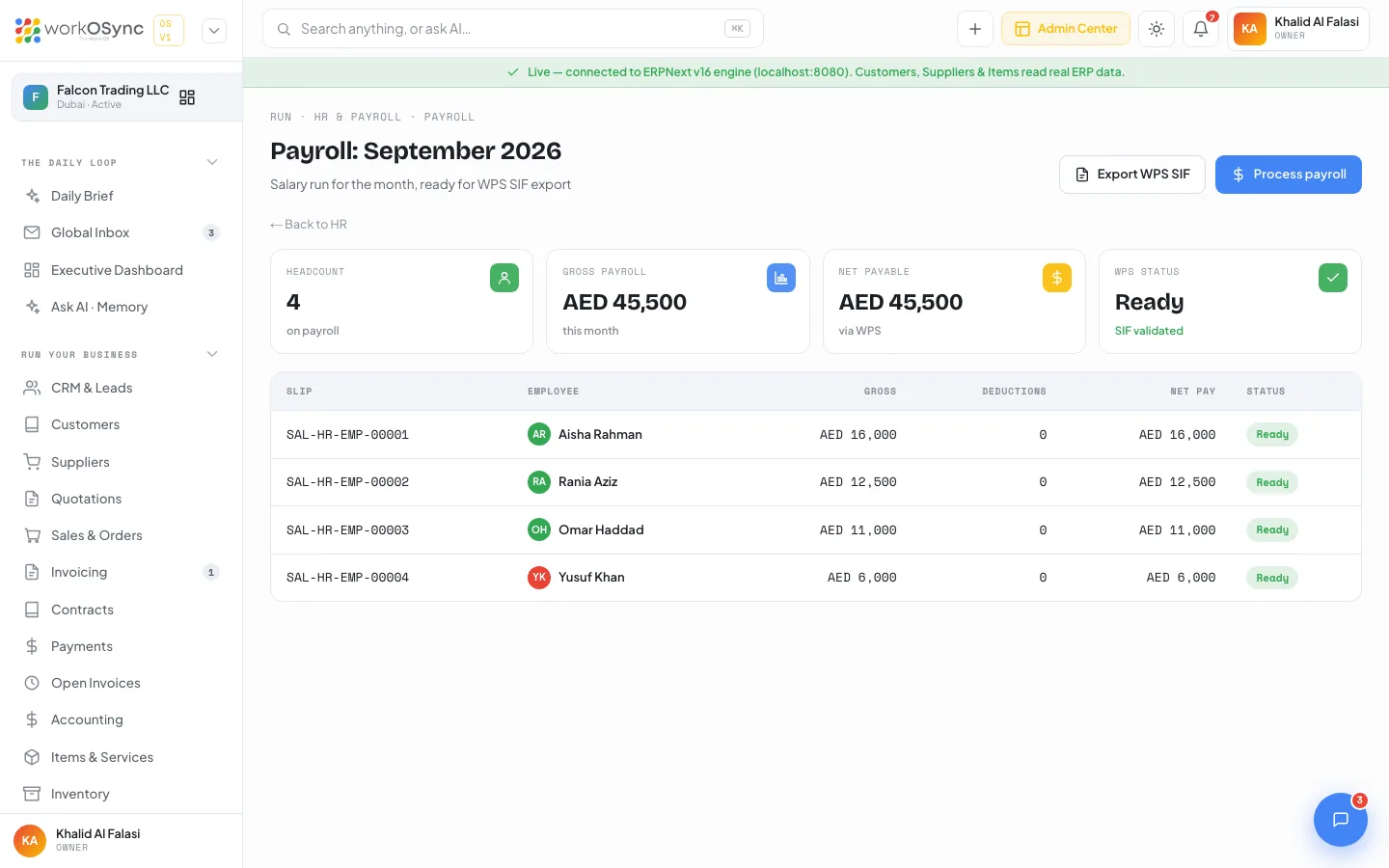
- Headcount on payroll.
- Gross payroll this month.
- Net payable via WPS.
- WPS status: Ready (SIF validated) before the run, Processed (SIF filed) after it.
The table has Slip, Employee, Gross, Deductions (0 when none), Net pay and Status, where Submitted and Ready are green. With no employees it reads "No employees on this payroll run."
Processing the run
Process payroll opens a confirmation that states the number of slips and the net total: confirming submits the salary slips, posts the payroll journal and locks the run. With the live engine the ERPNext salary slips are submitted and the toast reports how many; in demo mode the run is marked processed in this workspace. Afterwards every slip shows Submitted, the WPS tile reads Processed, the button reads Payroll processed and a Reopen run link appears under the table to unlock it.
Gross, deductions and net
| Figure | How it is derived |
|---|---|
| Gross | Basic plus allowances. |
| Deductions | Amounts withheld from gross. When the engine has no salary slips yet the run is built from employees and deductions show as "-" (zero). |
| Net pay | Gross minus deductions: the amount transferred through WPS. |
With the live engine the run uses ERPNext Salary Slips when they exist. Otherwise each row is built from the employee record with the slip id SAL-{employee id} and the status Ready.
WPS and the SIF file
The Wage Protection System (WPS) is the UAE's mandatory electronic salary transfer scheme, run by the Central Bank with the Ministry of Human Resources and Emiratisation. Employers pay salaries through a bank or exchange house that reports every transfer, so the authorities can see that staff are paid in full and on time. Paying outside WPS attracts fines and can block new work permits.
The Salary Information File (SIF) is the fixed-format file an employer uploads to its bank for each pay period. It contains:
- An employer record with the establishment's MOHRE employer ID, the employer's bank routing code, the pay period and the total salary amount.
- One employee record per person with their labour card number, the routing code and account (IBAN) of their salary bank, the number of days paid, the fixed salary, the variable salary and any leave days.
The bank validates the file, transfers the salaries and reports the payments to the Central Bank and MOHRE.
Exporting the SIF
Export WPS SIF builds the file in the browser and downloads it as WPS-SIF-{employer id}-092026.sif, a plain-text, comma-separated file in the WPS layout: one EDR (employee detail) line per person carrying the labour card number, the employer bank's routing code, the employee's IBAN, the pay period start and end, days paid, the net amount, the fixed salary, the variable salary and leave days; then one SCR (salary control) line with the establishment ID, routing code, file date and time, the month, the headcount, the total and the currency AED. A toast confirms the headcount and net total, and the export refuses when the run has no employees.
In this build the establishment ID, labour card numbers and IBANs in the file are generated placeholder values in the correct format, and the routing code is Emirates NBD's. The real identifiers arrive with the ERPNext payroll integration, which reads them from each employee's record. Until then, replace them in the file or in your bank's template before you upload. Read UAE compliance for the wider WPS, labour and licence obligations tracked in WorkOSync.
Running payroll each month
- Check the employee list
On
/hr, confirm the headcount and that each person's basic and allowances are right. Open a profile and use the Job Info tab to check the salary bank. - Open the payroll run
Click Run payroll. Review the gross, deductions and net per slip, and the Net payable KPI against your bank balance in Accounting.
- Process, then export the SIF
Click Process payroll and confirm, then Export WPS SIF and upload the file to your bank. Keep the payroll table export from the HR page for your own records.
Leave, expenses and time cards
Each is a tab on the employee profile. Leave shows balance tiles and a table of requests; the HR page's On leave tile summarises who is currently away. Expenses lists the person's claims with their status, and Time cards lists recent attendance rows, each marked Approved. Hours worked against projects come from timesheets and are charted on the Timesheets tab.
Attendance, leave, expense claims, performance appraisals and recruitment (job openings and the applicant pipeline) have their own workspace at /hr/operations, documented in HR operations. It feeds attendance, unpaid leave and reimbursements into the payroll run described above.
Give the HR role only to the people who should see pay. Assign roles in Roles and permissions so sales and staff users see colleagues' names and contact details but not their compensation.