Daily Brief
The Daily Brief is the home screen of WorkOSync. It opens on a greeting and a short written synthesis of everything that needs you today, compiled live from the ledger and your stores: cash and bank, overdue receivables, approvals waiting, tasks due, compliance renewals, stock to reorder and the sales pipeline. It is the morning half of the Daily Loop; the Executive dashboard is the same data as a board view.
The brief is built from companySnapshot, the live company snapshot, so its numbers are real documents, never typed in. When an AI key is configured in Settings the synthesis paragraph is written by your model and the title carries an AI-written pill; without a key it falls back to a deterministic Basic mode paragraph built from the same figures. Bring-your-own keys are covered in Ask AI and memory.
Opening the brief
The Daily Brief is at /dashboard, where WorkOSync lands after sign-in. The breadcrumb reads The Daily Loop · Daily Brief. The title greets you by first name, Good morning, {name} (it reads Good afternoon or Good evening by your clock), and the subtitle shows {company} · {date}, for example Friday, 9 October 2026. A pill next to the title reads AI-written or Basic mode, and the header carries one action, Email me the brief.
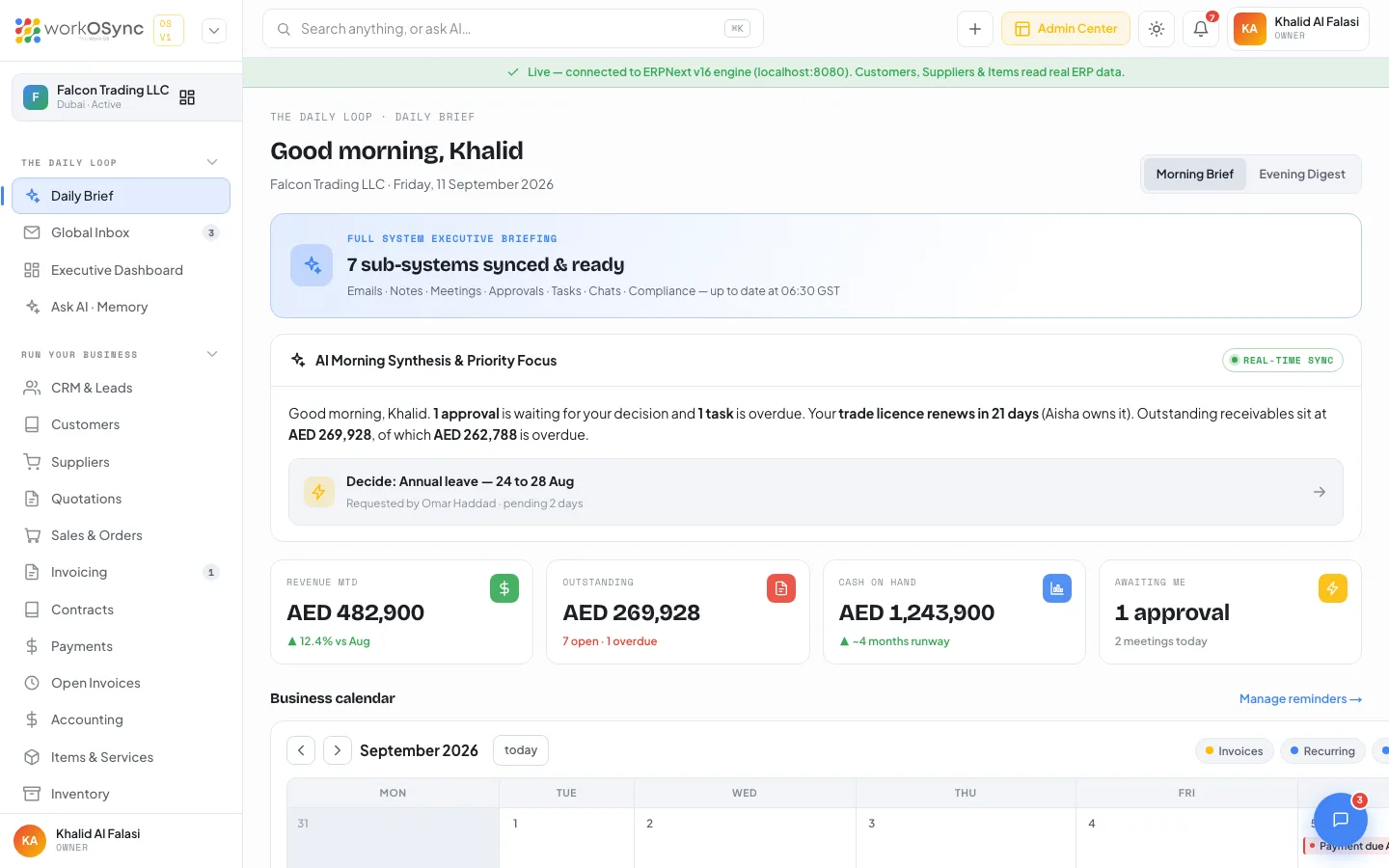
The synthesis
The hero card is headed Executive briefing and leads with either {N} things need attention today or, on a clear day, Nothing urgent. Nice. Below it the synthesis card (titled AI morning synthesis with the model name, or Morning synthesis in basic mode) carries one tight paragraph that leads with what needs a decision and quotes only AED figures from the snapshot. A Focus one-tap row highlights the single most important item, linking straight to it.
The four KPIs
| Tile | What it shows |
|---|---|
| Cash on hand | Cash and bank balances, with {n} supplier bills unpaid underneath. |
| Outstanding | Receivables outstanding, with {open} open · {overdue} overdue ({amount}). |
| Pipeline | The value of open deals and quotations, with the count of deals and open quotes. |
| Awaiting me | Approvals pending, with {n} tasks due · {n} renewals · {n} meetings underneath. |
The business calendar
A month grid under the KPIs assembles events from your invoices, recurring profiles, estimates, deliveries, payments and reminders. Legend toggles (Invoices, Recurring, Estimates, Deliveries, Payments, Reminders) filter the chips by kind; each day shows up to three chips and a +{n} more. A side panel lists the selected day, or the next events when nothing is selected, each with a status badge (Overdue, Due, Paid, Draft). A Manage reminders → link opens Notes and reminders.
Today across your business
The action list turns the snapshot into clickable rows, in priority order. On a clear day it shows one green All clear row.
| Category | Row and where it goes |
|---|---|
| Approvals waiting | Decide: {title}, badged Awaiting you, to Approvals. |
| Overdue receivables | {invoice} overdue with the customer, amount and due date, to the invoice in Invoicing. |
| Compliance due | Renewals within 30 days with the expiry and owner, badged Expired or {n} days, to UAE compliance. |
| Tasks due | The task subject with status and assignee, badged Overdue or Due today, to the task in Projects. |
| Meetings today | The meeting with its time and attendees, to Meetings. |
| Inbox open | An open thread with its contact and channel, to the Global Inbox. |
| Reorders / low stock | Reorder {item} with what is left and the reorder level, badged Out or Low, to Items and inventory. |
Emailing the brief
Email me the brief rebuilds the brief and sends it to your own address, headed Daily brief · {date} · {company}, with a KPI table (cash, receivables, overdue, pipeline, tasks due, approvals pending, compliance due), the Today across your business items and an Open the Daily Brief button. Sends are rate-limited to five every ten minutes. A separate scheduled job emails the same brief to owners and admins each morning; both use the sendmail or SMTP transport on the server, so delivery is confirmed on the VPS rather than in local development.
- Read the synthesis
Start with the headline and the paragraph; the Focus row points at the single most urgent item.
- Clear the action list
Work down Today across your business: decide approvals, chase overdue invoices, action due tasks and renewals.
- Check the calendar
Scan the month for what is due and coming, filtering by kind with the legend toggles.
- Send it on
Use Email me the brief to keep a copy or forward the morning read.
The brief is worded for the morning, and the AI synthesis and the evening recap are part of the AI Work OS layer. For the board view of the same live data, revenue trend and pipeline, open the Executive dashboard.